





























































































Loofi
 Guide2 min read
☷Table of contents▾
Loofi
Freemium
Explore SQL Data with Loofi
VISIT WEBSITE
Introduction:
Are you a non-technical individual looking to explore your SQL-based data effortlessly?
Introducing Loofi, a web-based tool designed specifically for SQL-based data exploration.
With Loofi, you can easily browse through your database tables, submit queries, and view SQL outputs.
Whether you’re a beginner or an expert, Loofi’s preset queries and user-friendly interface make data exploration a breeze.
Discover insights, find specific information, and gain a deeper understanding of your data with Loofi.
Want to earn with the tools you are reading about?
The $50K AI Income Roadmap: 20 modern ways to earn with AI, with steps, prompts and real numbers. Free, one chapter a day.
Try Loofi today and unlock the power of your SQL database with ease.
Overview:
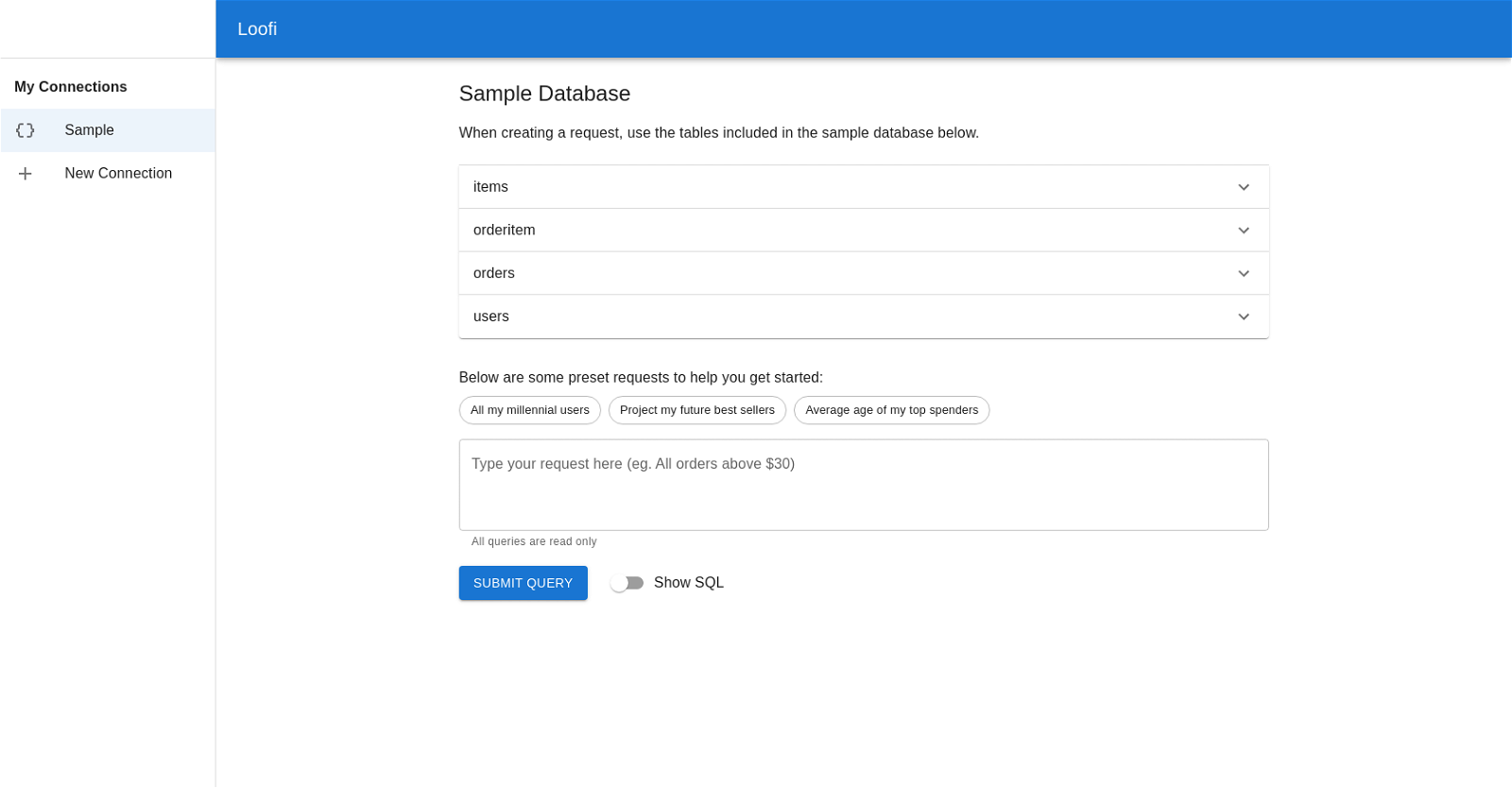
Loofi is a web-based tool that allows users to easily explore data from a predetermined database. The tool is specifically designed for SQL queries and the tool’s UI provides preset queries to help users get started.
The interface includes options to browse the included database tables, submit queries, and view the SQL output of queries. The tool is created using create-react-app, a framework used to rapidly develop web applications.
The sample database included consists of tables for items, order items, orders, and users. These tables contain fields like item_id, item_name, price, order_id, user_id, order_date, total_amount, username, email, full_name, date_of_birth, created_at, updated_at, and is_active.
Users can use the pre-canned queries to explore their data, or they can write their own queries to find specific information. All requests are read-only to prevent accidental changes to the database.
Overall, Loofi is a helpful tool for non-technical individuals seeking to explore data in a relatively simple way. It is particularly useful for those who are set up with an existing SQL database and are seeking an easy way to view and explore it.
Benefits:
- Easy data exploration: Loofi allows users to easily explore data from a predetermined database.
- Specifically designed for SQL queries: The tool is specifically designed for SQL queries, making it efficient and effective for data exploration.
- Preset queries: The tool’s UI provides preset queries to help users get started, making it easier for non-technical individuals to explore data.
- Browse database tables: The interface includes options to browse the included database tables, allowing users to easily navigate through the data.
- Write custom queries: Users can write their own queries to find specific information, giving them flexibility in exploring the data.

The TechLaugh editorial team, led by founder Akshay Kumar Singh, tests AI tools on real marketing and creative work. We check pricing on the day of writing, note free-plan limits, and update guides when tools change or shut down.