



































































































Spinach AI Review: Unlimited Free Notes and One Big Catch
 Review9 min read
☷Table of contents▾
Spinach AI is a meeting assistant that joins your calls and writes the notes. It then pushes the follow-up work, like tickets and CRM updates, into the tools your team already uses. The free Starter plan gives you unlimited recording and transcription, which no big rival matches. Whether you should pay for it depends on how many meetings your team sits through each week.
Spinach AI ★★★★☆ 4.2/5
A meeting note taker that stands out for one reason: the free plan does not cap your transcription minutes. The paid tiers add smarter summaries and deep integrations. Meeting-heavy teams on the pay-as-you-go plan should watch their bill.
Pros
- Free plan has unlimited recording and transcription
- Transcribes in up to 100 languages
- Works with Zoom, Google Meet, Teams, and Webex
- Pushes action items into Jira, Slack, and CRMs
- SOC 2 Type 2, GDPR, and HIPAA compliance
Cons
- Best AI features sit behind the Business plan
- Pay-as-you-go costs add up fast for busy teams
- A bot joins your call, which some guests dislike
- API access costs extra on some plans
Key takeaways
- The Starter plan is free and does not limit how much you record or transcribe.
- Paid plans start at $2.90 per meeting hour, or $19 per user per month for Business (billed annually; $29 billed monthly).
- Spinach joins Zoom, Google Meet, Microsoft Teams, and Webex calls.
- It connects natively to about two dozen tools, including Jira, Slack, Salesforce, and HubSpot, plus thousands more through Zapier.
- Spinach says customer data is never used to train AI models.
What is Spinach AI?
Spinach AI is an AI meeting assistant that records your video calls and turns them into notes your team can act on. Action items land where your team works, whether that is a Slack channel, a Jira ticket, or a Salesforce record.
The company started out as a Scrum helper for software teams under the spinach.io name. That version focused on standups and sprint planning. The product has since grown into a general meeting tool for sales, HR, and operations teams, and it now lives at spinach.ai. Companies like Netflix, Zendesk, and GoDaddy appear on its customer list.
Spinach supports transcription in up to 100 languages. That matters if your team runs calls in more than one language, because many rivals handle far fewer.
Are the notes any good?
Mostly, yes. Spinach holds a 4.6 out of 5 rating across 25 reviews on G2. Reviewers praise how it takes an unstructured call and returns structured meeting minutes, and they like getting the summary by email with one-click ticket creation. The complaints are worth knowing too: some users report that summaries can slip in accuracy over time and that the AI struggles with people’s names. Skim your first few summaries before you trust them with clients.
How does Spinach AI work?
You connect your Google or Microsoft calendar. Spinach then joins the meetings you choose. Here is the flow for a typical call:
- Connect your calendar. Sign up at spinach.ai and link Google Calendar or Microsoft Calendar.
- Pick your meetings. Tell Spinach which calls it should join. You can set it to skip 1-on-1s or personal events.
- Let it listen. Spinach joins as a participant on Zoom, Google Meet, Teams, or Webex and records the call.
- Get your notes. A few minutes after the call ends, you get a summary, the full transcript, and a list of action items.
- Send the work onward. Spinach can post the recap to Slack or email, draft follow-ups, create tickets, and update your CRM.
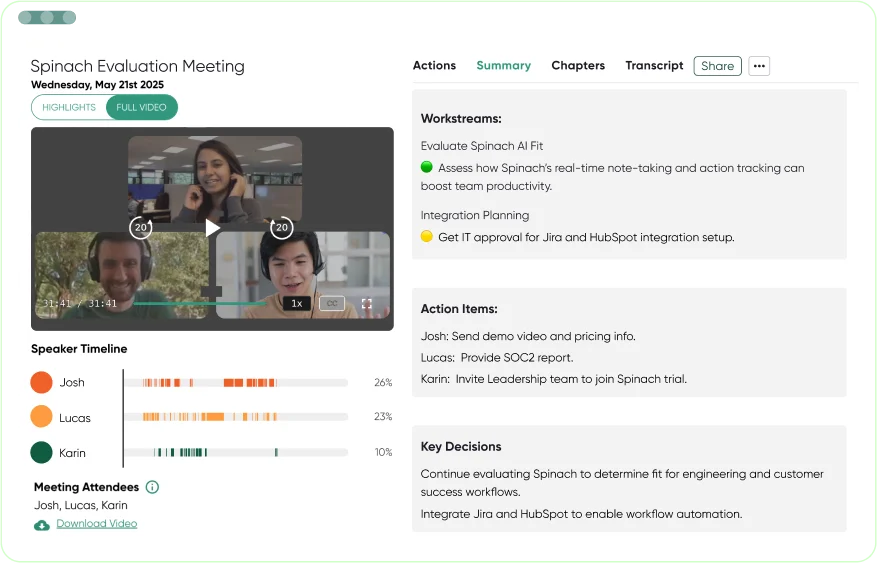
Prefer to see it in motion? This short demo comes from Spinach AI’s own channel:
What can Spinach AI do?
The core job is notes. Spinach records the call and delivers a transcript plus a summary you can share. Around that core, it handles the boring work that follows a meeting:
- It drafts recap emails and sends them for you.
- It creates and updates tickets in Jira, Linear, Trello, ClickUp, Asana, and Monday.com.
- It updates records in Salesforce, HubSpot, Zoho, and Attio after sales calls.
- It posts summaries to Slack and syncs docs to Notion and Confluence.
- It answers questions about past meetings with AI search across your transcripts.
There is also a Transcript and AI Summary API. It comes with the Enterprise plan and costs extra as an add-on on some other plans. Most teams will not need it, but it is there if you want meeting data inside your own apps.
Want to earn with the tools you are reading about?
The $50K AI Income Roadmap: 20 modern ways to earn with AI, with steps, prompts and real numbers. Free, one chapter a day.

Is Spinach AI free? Pricing explained
Yes. The Starter plan is free and includes unlimited meeting recording, transcription, and basic AI summaries. You do not hit a monthly minutes wall like you do on most free notetakers.
| Plan | Price | What you get |
|---|---|---|
| Starter | Free | Unlimited recording, transcription, and basic AI summaries |
| Pro | From $2.90 per meeting hour | Pay-as-you-go pricing with unlimited users |
| Business | $19/user/month billed annually, $29 billed monthly | Unlimited meetings, advanced AI, onboarding, dedicated success manager |
| Enterprise | Custom | SAML SSO, custom data retention, dedicated API, compliance monitoring, BAA |
The Pro plan’s pay-as-you-go model is unusual. You pay from $2.90 for each hour of meetings Spinach processes, and you can add your whole team without per-seat fees. That is cheap for a team with few meetings. It gets expensive for a team that lives on calls.
What the free plan leaves out
Starter covers the capture side of the job, and the word doing the work in Spinach’s own plan description is basic. The deeper features sit on paid plans: advanced summary formats, the workflow automations that file tickets and update your CRM, and onboarding help on Business. Spinach also sells its transcript API separately on some plans.
If you want a record of what was said and a short summary, the free plan is enough, and you will never pay a cent. If you want Spinach to do the follow-up work for you, that is exactly the part it charges for.
What Spinach AI costs for three real team sizes
Prices per meeting hour are hard to picture, so here is the math for three common setups. The numbers use the published base rates and a four-week month: $2.90 per meeting hour on Pro, and $19 to $29 per user per month on Business depending on whether you pay annually or monthly.
| Team | Meeting load | Pro (pay-as-you-go) | Business (per seat) | Cheaper choice |
|---|---|---|---|---|
| Freelancer + 2 clients | 3 hours/week | ~$35/month | $19 to $29/month | Business, or stay on Starter |
| 5-person startup | 10 hours/week | ~$116/month | $95 to $145/month | Roughly a tie, count your hours |
| 20-person sales team | 40 hours/week | ~$464/month | $380 to $580/month | Business, for the CRM features alone |
Pay-as-you-go wins when meetings are rare, and seats win when they are daily. If your team debates which side it falls on, run a month on Starter first and count the hours Spinach actually joins.
Do the math before picking Pro
A team that logs 40 meeting hours a week would pay about $464 a month on pay-as-you-go. The Business plan at $19 to $29 per user is often cheaper once your whole team meets daily. Count your real meeting hours first.
Which apps does it connect to?
Spinach works with the four big meeting platforms: Zoom, Google Meet, Microsoft Teams, and Webex. Beyond that, it offers about two dozen native integrations, and Zapier opens the door to thousands more. These are the ones most teams will care about:
| Category | Integrations |
|---|---|
| Project management | Jira, Linear, Trello, Notion, ClickUp, Asana, Monday.com, Confluence |
| Communication | Slack, Google Calendar, Microsoft Calendar |
| CRM and sales | Salesforce, HubSpot, Zoho, Attio |
| HR and IT | BambooHR, Rippling, Workday, Okta, SCIM |
| Automation | Zapier, NetSuite, SAP, Transcript API |
Is Spinach AI safe to use at work?
Spinach holds SOC 2 Type 2 certification and states that it complies with GDPR and HIPAA. The company says customer data is never used to train AI models, and it backs its security claims with third-party audits and standard controls like encryption. Enterprise customers can sign a Business Associate Agreement, which health teams need.
One thing to plan for: Spinach joins your call as a visible participant. Clients and interview candidates will see it. Tell people they are being recorded. In some places the law requires consent from everyone on the call.
How to keep Spinach out of a meeting
You stay in control of where the bot goes. When you connect your calendar, you pick which meetings Spinach joins, and you can exclude 1-on-1s and personal events from the start. During a live call, the host can remove the Spinach participant the same way you remove any attendee.
Anything already captured can be cleaned up afterward. Spinach’s account settings let you remove meetings and delete your account data, and its help center has a whole section on data, account, and meeting removal. If your company handles patient or financial data, look at the Enterprise plan, where the custom data retention rules and the BAA live.
Pro tip
Set Spinach to skip your 1-on-1s and personal events when you connect your calendar. You keep the bot out of sensitive talks and save paid meeting hours at the same time.
Spinach AI vs Otter vs Granola
Spinach’s closest rivals take different paths. Otter is the veteran with a capped free plan. Granola skips the bot and works like a smart notepad on your device.
| Feature | Spinach AI | Otter | Granola |
|---|---|---|---|
| Free plan | Unlimited recording and transcription | 300 minutes per month | Free with limited meeting history |
| Paid from | From $2.90 per meeting hour | $8.33 per user/month (annual) | $14 per user/month |
| How it captures | Bot joins the call | Bot joins the call | Runs on your device, no bot |
| Best for | Teams that push actions into Jira, Slack, and CRMs | Individuals who want live transcripts | People who dislike bots in their calls |
Pick Spinach when the notes need to end up somewhere else, like a ticket or a CRM record. Otter suits people who mostly want a live transcript while they talk. Granola fits anyone whose guests would balk at a bot on the call.
Who should use it, and who should skip it
Use it if your team runs lots of meetings on Zoom, Meet, Teams, or Webex and the follow-up work keeps slipping. The free plan alone beats most rivals for pure transcription. Sales and support teams get real value from the CRM updates.
Skip it if you rarely meet, you record mostly in-person conversations on your phone, or your clients would object to a bot on the call. Solo users who just want transcripts can start with the free plan but may find lighter tools simpler.
Frequently asked questions
What is Spinach AI?+
Is Spinach AI free?+
What is the Spinach AI Starter plan?+
How do I use Spinach AI?+
Verdict: worth it for meeting-heavy teams
Spinach AI earns 4.2 out of 5. The free Starter plan is the most generous in this category, and the integrations turn notes into finished work instead of another document nobody reads. The main caution is cost planning: pay-as-you-go looks cheap until you count your real meeting hours. Start free, run it for two weeks, then decide if the Business plan pays for itself.
Best guides to read next
- Trint review: AI transcription for journalists and teams
- XNote review: the AI smart notebook that digitizes handwriting
- Podnotes review: turn audio into show notes
Which meeting notetaker does your team trust? Tell us in the comments. We read every one.

The TechLaugh editorial team, led by founder Akshay Kumar Singh, tests AI tools on real marketing and creative work. We check pricing on the day of writing, note free-plan limits, and update guides when tools change or shut down.